
How we use it
Seventeen thousand words is not a screen’s job.
An AI research agent will hand you a report the length of a novella, written in Markdown. Here is how we read one of ours on an e-reader, with contents that work and its tables and diagrams intact.
A report nobody wants to read in a chat window.
In September we asked an AI agent to research the Australian app market for us. We wanted to know who makes apps like ours, how the stores pay, and what help a small Australian business can get. It came back with a report of about 17,000 words, plus six research files behind it with another 43,000.
All of it was Markdown. That is not a quirk of one tool: Claude, ChatGPT and most research agents write Markdown by default. You get headings made of #, tables drawn with pipes, links, and more and more often, diagrams written as Mermaid code.
It is a poor format to read 17,000 words in. In a text editor it is plain text full of symbols. In a chat window it is one long scroll with no page numbers, and no way back to where you stopped yesterday. Saved as a PDF, it is an A4 page that a phone makes you pinch and drag. A report like this is worth reading slowly, over a few evenings, and the screen made for that is an e-reader.
What Bindery made of it.
Bindery turns Markdown into Word, PDF, EPUB and Kobo’s KEPUB on an iPhone or iPad, and does the whole conversion on the device. We added the report, chose Kobo, and sent the file to our 8-inch Kobo. Here is what was in it, and what each part became:
| In the Markdown | On the e-reader |
|---|---|
| 52 headings | Every one an entry in the reader’s own contents menu |
| 9 tables, 74 rows | Tables, kept inside the width of the screen |
| Links from one section to another | Links that go to that section |
| 96 links to sources | Links that open the source |
| 9 Mermaid diagrams | Pictures, drawn on the phone by the app itself |
The contents are what change how a long report reads. These are the section headings of one of the research files, the one on app-store economics, exactly as the agent wrote them:
## 1.1 Commission rates in 2026
## 1.2 RevenueCat State of Subscription Apps 2026 — the real numbers
## 1.3 Churn arithmetic at A$3–5/month — show the working
## 1.4 Mac App Store vs direct sale
## 1.5 Australian tax
On the Kobo each of those lines is an entry in the contents menu, with the headings under it indented beneath, and every one is somewhere you can go. “Back to the pricing section” is a few taps, not a minute of scrolling. Some older e-readers read only an older kind of contents file, so Bindery writes both kinds.
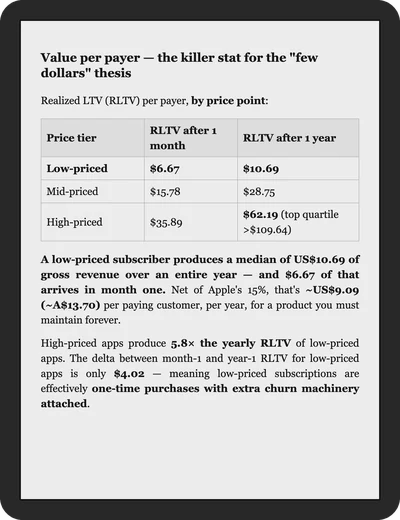
Tables are where a chat window usually gives up. This one is from the same file; the agent took the figures from RevenueCat’s State of Subscription Apps 2026 and cited it:
| Price tier | RLTV after 1 month | RLTV after 1 year |
|---|---|---|
| **Low-priced** | **$6.67** | **$10.69** |
| Mid-priced | $15.78 | $28.75 |
| High-priced | $35.89 | **$62.19** (top quartile >$109.64) |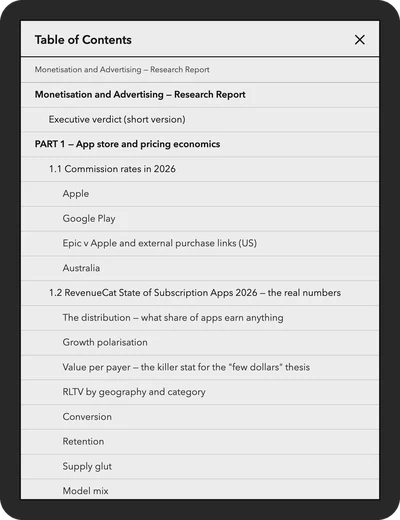
Diagrams need one more step. An agent that draws in Mermaid writes a few lines of code and expects something else to draw the picture. Bindery draws it on the phone, with a copy of Mermaid it carries inside the app, so the diagram reaches your e-reader as a picture rather than as code.
This is part of one of the nine in the main report, two of its three stacks, as the agent wrote it:
flowchart TD
    T["ONLY WHEN A NAMED<br/>CUSTOMER ASKS"]
    T --> T1["ISO 27001, or SOC 2<br/>if your buyers are US"]
    T1 --> T2["AWS Marketplace listing"]
    T2 ~~~ X["NEVER AT THIS SCALE"]
    X --> X1["IRAP. Both certifications.<br/>Azure and GCP marketplaces."]
    X1 --> X2["Government panels: reference<br/>checks you cannot pass."]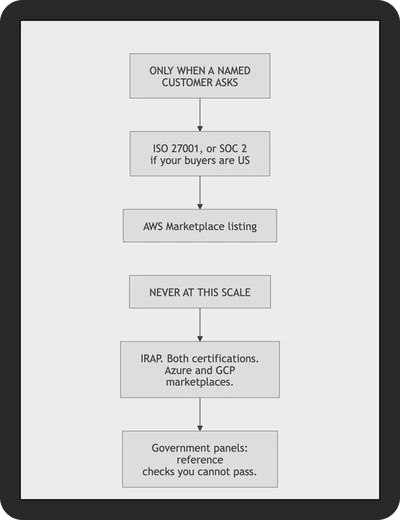
We chose Kobo rather than plain EPUB because the reader is a Kobo. KEPUB is Kobo’s own variant of EPUB, and it is what lets a Kobo show the pages left in a chapter and keep your place when you move between devices. For a Kindle, choose EPUB: Amazon’s Send to Kindle accepts it. For Apple Books on the same phone, choose EPUB too.
The first time, it came out wrong.
When we first converted the research files, every format had mistakes in it. The report itself was fine. The trouble is that agents write GitHub’s variant of Markdown, which differs from the original in small ways, and a long research report uses every one of them.
Money was the clearest case. The main report alone has 93 lines with a dollar amount in them, and many Markdown tools, Bindery among them, read the text between two dollar signs as a formula, because that is how mathematicians write one. Here is the first of the “three numbers to carry” in the economics file:
- A **low-priced** subscription app returns a median **US$10.69 per payer
  over an entire year** — vs **US$62.19** for a high-priced one.
Bindery took the first dollar sign as the start of a formula and the second as its end. Everything from “10.69 per payer” to “vs US” became one formula, set in italics; both dollar signs disappeared, and the bold around them came apart. Smaller mistakes were just as visible. A list written straight under its sentence ran into the paragraph. A web address typed as plain text was not a link. A table without a header row came out as a paragraph of pipes.
We checked each kind of block against how GitHub displays it, and changed the converter rather than the report. A dollar sign followed by a number is money now, an address is a link, and a list is a list. Bindery 2.0 has those changes. You should not have to edit what an agent wrote before you can read it.
Four things to ask your agent for.
Much of what the book will look like is decided by the agent before Bindery sees it. If you know you will read the result on an e-reader, ask for these:
- Real headings for every section. The contents are built from them. A report with bold lines where the headings should be has nothing to navigate.
- Diagrams that run top to bottom. An e-reader’s screen is taller than it is wide. Ours were all vertical flowcharts, and every one fitted a page with its text scaled up, not down. A wide left-to-right chart is shrunk to the width of the screen, text and all.
- Several files are fine. Add them all, or the whole folder, and set their order; Bindery joins them into one book with one contents. In the PDF and Word versions each file starts on a new page, and links between the files still work.
- Fewer columns in tables. On a phone-sized screen a four-column table leaves each column about eight letters wide. Bindery sets tables of four columns or more a little smaller and hyphenates long words, but three columns still read better than six.
Before converting, press Preview. It shows the start of the book in the format you chose, made by the same code that makes the real file, and it is free.
What it costs, and what leaves the phone.
Nothing you convert leaves your device. There is no account and no server, the conversion works with the network off, and the app asks for no permissions.
Bindery is free for 20 pages a month, where a page is 4,000 characters of Markdown, a size measured against Bindery’s own PDF output. Our report was 29 of those pages, more than a month’s free allowance; a long agent report often will be. Bindery Pro removes the limit and is a one-off purchase, not a subscription. A conversion that fails costs no pages.
The agent read nearly a hundred sources so that we would not have to. Reading its report properly was the least we could do.
The excerpts are copied from what the agent wrote, two of them cut short; the figures in them are RevenueCat’s, as the agent cited them, and we have not checked them. The pictures are renders of the file Bindery wrote, at the screen size of an 8-inch Kobo, not photographs of one. Kobo is a trademark of Rakuten Kobo Inc. and Kindle of Amazon; neither is connected with The Owlery Works. More about Bindery.