
Meeting Cue · by The Owlery Works
Presenters get a teleprompter.
Why shouldn't you?
It listens to your meeting, reads the documents you brought to it, and suggests something you can actually say — the question to ask now, the point to make in a minute, the line that keeps the room with you.
On the App Store. Get Meeting Cue.
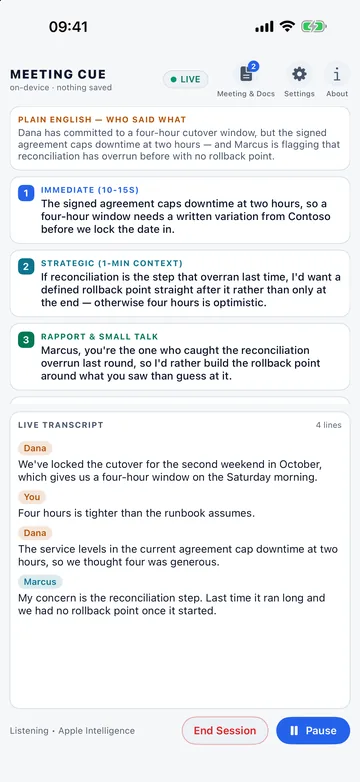
What it is for
The screen the rest of us never get.
Nobody thinks less of a newsreader for reading their lines. Yet the rest of us are expected to hold a forty‑page specification in our heads, follow a fast conversation, and come out with the right question before the moment passes.
Meeting Cue is that screen, for the meetings the rest of us are in.
New in 1.1: Meeting Cue now knows who’s speaking.
On an iPhone
Start to finish, in five screens.
The meeting shown here is invented — dialogue, participants and documents all written for the screenshots.
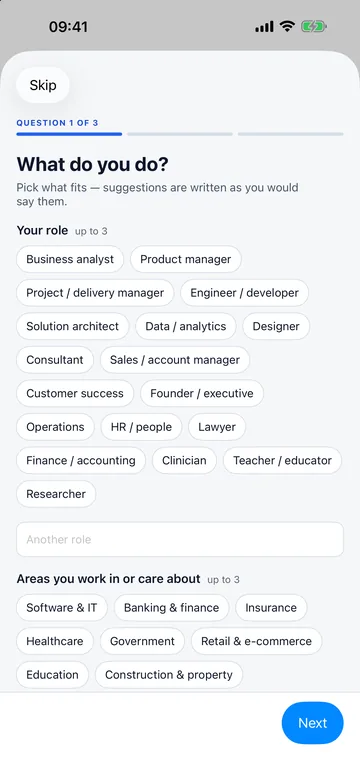
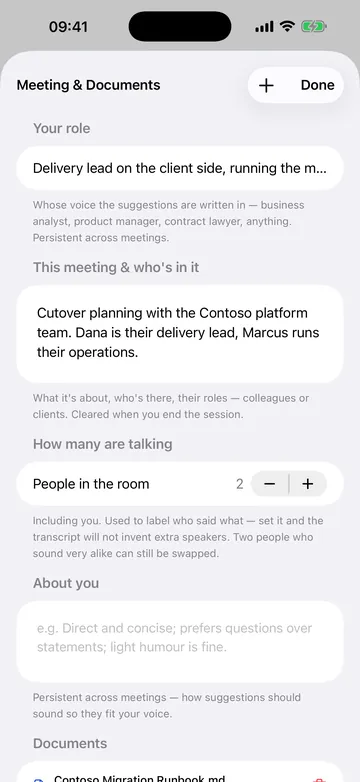
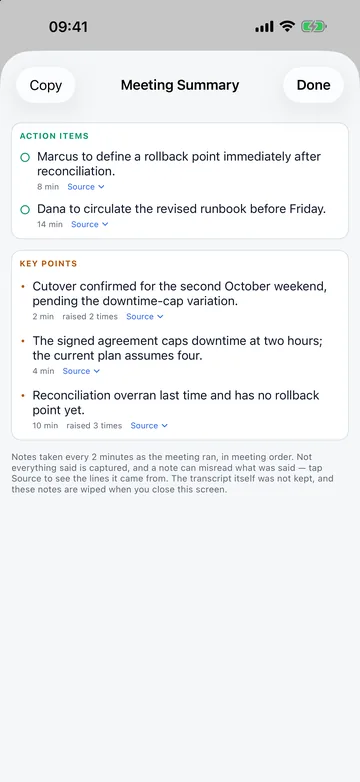
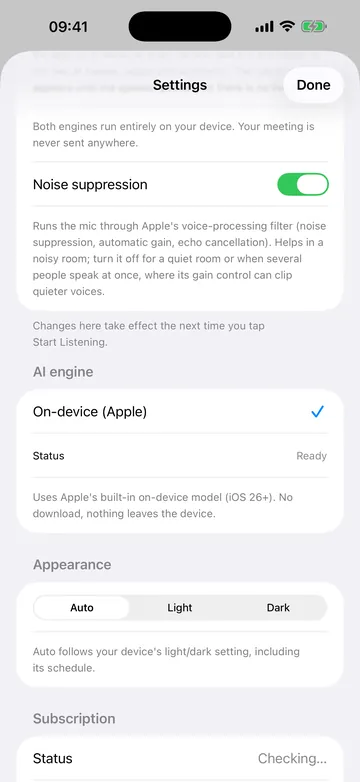
Scroll sideways for all six.
On an iPad
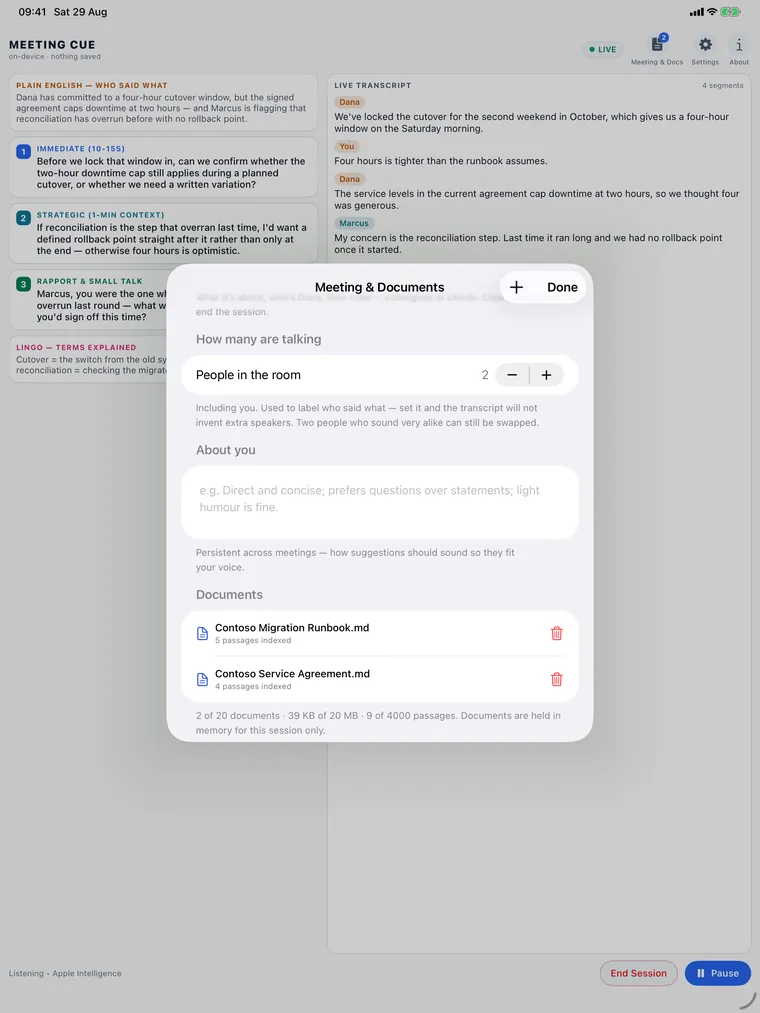
The same app, given room to breathe.
The suggestions and the transcript sit side by side instead of stacking, and the documents sheet opens over a meeting that is still running. One app, one purchase — not a companion.
In detail
What it actually does.
-
Live transcript, with speakers
Text appears while people are still talking, each line labelled with who said it.
-
Your documents, searched as you talk
Import PDFs, text and Markdown. It finds the passage that bears on what was just said — no keyword hunting.
-
Four things you can say
What is happening in plain English, the immediate question, the strategic point, the rapport line — and a gloss of any jargon in the room.
-
Written in your voice
Pick your role and how you like to sound — a few taps the first time you open it — and the suggestions come out as something you would say.
-
Notes when it ends
End the session and it lists the action items and key points, each over the lines it came from, so you can check a note against what was said. Copy them if you want them; closing the sheet erases them.
-
Works with no signal
Everything runs on the phone, so a basement meeting room changes nothing.
Privacy
Nothing leaves your device.
Audio, transcript and suggestions are held in memory, never written to disk, and erased when the session ends — which is why it is usable in a room where a cloud notetaker would not be.
One thing is yours rather than ours: tell the room you are using it. Recording laws differ by country and state, and consent is yours to get.
| Devices | iPhone and iPad, iOS 26 or later, with Apple Intelligence supported and switched on — that is what writes the suggestions. |
|---|---|
| Languages | English only, for now. |
| Network | Not required, and never used for your meeting. |
| Account | None. |
| Stored on disk | Your settings, your answers to the setup questions and how much listening time you have used. Nothing from a session. |
| Free trial | Your first 20 hours of listening, no payment details needed. Only time spent listening counts. |
| After that | Meeting Cue Pro, a subscription through the App Store. |
The price for your country is shown in the App Store and in the app before you subscribe, and charged to your Apple Account at confirmation. It renews automatically unless cancelled at least 24 hours before the period ends. Manage or cancel in Settings › Apple Account › Subscriptions.
In plain terms
A private AI meeting assistant that runs on the device, not on a server.
Meeting Cue is an iPhone and iPad app, a private AI meeting assistant. It transcribes a meeting live, searches the documents you imported for the passages that bear on what was just said, and suggests what to say next, in the voice of the role you gave it. Speech recognition, document search and the suggestions all run on the device. It records nothing and saves nothing: audio, transcript and documents are erased when the session ends, and the notes it lists at the end are erased when you close them. The suggestions need iOS 26 or later on a device with Apple Intelligence switched on; the transcript and the search work without that. It understands English only. There is no account. After the first 20 hours of listening, which are free, it is a monthly or yearly subscription through Apple. It is made by The Owlery Works in Sydney, Australia. More: how to use it, how the live suggestions work, and how it compares with a cloud meeting assistant.
Something not working?
Raise a case with or without an email address — your choice.